
HTML-to-PDF Converter – A Handy Tool
Posted March 18, 2009 | Laura Christianson
Here’s a slick little tool that converts a Web page into a PDF document. It’s called HTML to PDF Converter.
I love this because:
- It’s free.
- You don’t have to register.
- I’m constantly making screen shots of Web sites and blogs I create, but I always have to edit the screenshots to remove the toolbars. This converter creates a clean PDF of the entire Web page.

- Here’s how the HTML-to-PDF Converter works (click the image to see larger size)
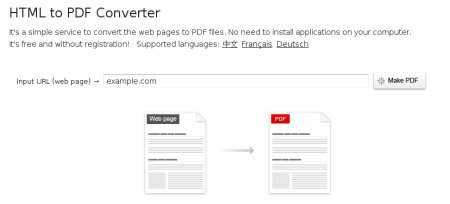
Once you’ve converted your Web page to a PDF, save the file. Attach it to e-mails, print it, insert it into another document/presentation, or create a link so people can download the file, like I did for this client’s Website I just finished bulding:
One tiny glitch – I noticed that the e-blast signup form that was supposed to appear directly below the banner (see original at http://bcultural.org/) did not get converted on the PDF. But other than that, the entire page is intact.
Thanks to Daniel Scocco’s Daily Blog Tips for this great tip!
I tried it on a Twitter page and it didn’t work. I tried it on a regular page and it made text centered instead of justified.
If you’re using a Mac, you can make anything a PDF with a simple click…and it’s accurately made.
I tried it on a Twitter page and it didn’t work. I tried it on a regular page and it made text centered instead of justified.
If you’re using a Mac, you can make anything a PDF with a simple click…and it’s accurately made.
I tried it on a Twitter page and it didn’t work. I tried it on a regular page and it made text centered instead of justified.
If you’re using a Mac, you can make anything a PDF with a simple click…and it’s accurately made.
I tried it on a Twitter page and it didn’t work. I tried it on a regular page and it made text centered instead of justified.
If you’re using a Mac, you can make anything a PDF with a simple click…and it’s accurately made.
Joel,
Thanks for testing this! I just tested the one page and it mostly worked. Always appreciate good workarounds.
Anyone else out there willing to test it on something? Let us know how it works.