
How to Set up a Gravatar
 This week’s question for the Blogging Barista:
-
What is a gravatar and why do I need one?
A gravatar is a Globally Recognized Avatar – your avatar is the thumbnail image that appears when you comment on someone’s blog.
If you have a Blogger profile, the image that accompanies your profile is posted whenever you comment on blogspot.com blogs. But that avatar works only for blogs hosted by Blogger. To make your avatar show up on WordPress (and other) systems, you’ll need to create a gravatar… a universal avatar.
Why do you need a gravatar?
To develop brand identity.
A custom gravatar – I recommend using a professional-looking photo of your smiling face or your company logo – establishes a consistent look for your brand. Wherever you go on the Web, your gravatar subtly promotes your brand. Eventually, people will begin to associate your face with your brand.
If you don’t use a gravatar, you’re stuck with a default avatar. WordPress, for example, gives me the following default options:
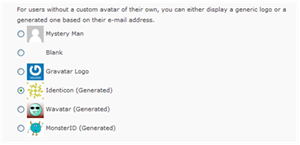
A “Monster ID” to brand my company? I don’t think so!
I ran into one glitch after creating my own gravatar; I noticed it wasn’t appearing on many of the comments I was publishing on other people’s blogs.
My problem?
I was commenting via an e-mail address that didn’t correspond with the gravatar I had created. (Depending on what type of blog I’m commenting on, I may use my business address or my personal address).
The solution?
I added additional e-mail addresses to my gravatar account. Here’s how to do it:
Go to:
- My Account
- Add an e-mail address
- Type in the address
- You will receive an activation e-mail
- Click the link, which takes you back to gravatar.com
- Select an e-mail address to modify
- Click an image you’ve already uploaded (or add a new one), click “Confirm”

Within minutes, my gravatar on comments I had already posted was updated to include my gravatar.
Your turn! Create your own gravatar right now and post a comment here, so we can see who you are!
Carrie – I think you may be referring to a favicon, which is different than a gravatar. Contact me and we’ll talk. – Laura
[…] post first appeared May 18, 2009 on Blogging Bistro. Used by kind […]
[…] post first appeared May 18, 2009 on Blogging Bistro. Used by kind […]
Had no idea this was available. Thanks!
Had no idea this was available. Thanks!