
How to Create a Custom Subject Line for Your Blog’s Feedburner E-Mail Updates
 One of the best ways to build a loyal readership for your blog is to encourage visitors to subscribe via e-mail or RSS feed.
Many bloggers use Feedburner (owned by Google) to manage their blog’s feed. By default, people who subscribe to Feedburner blog updates via e-mail will receive a generic e-mail whose Subject line reads something like:
Blogging Bistro – Latest Updates
But did you know you can customize the Subject Line so it displays the title of your latest blog post? The Subject Line for the article you’re reading would display like this:
Blogging Bistro: How to Create a Custom Subject Line for Feedburner E-Mail Updates
Most people scan their Subject lines before opening an e-mail; a dynamic Subject line will entice more readers to open it than the bland, “Blogging Bistro – Latest Posts” subject line.
How to tweak your Feedburner settings and create dynamic Subject lines:
- Log in to your Feedburner account.
- Click “My Feeds” and then click the name of the feed you want to update.
- Click the “Publicize” tab.
- In the lefthand sidebar, click “Email Subscriptions.”
- That’ll open a sub-menu. Still in the left sidebar, click “Email Branding.”
- Copy the following line of code and paste it in the form that says, “Email Subject/Title”:
${latestItemTitle}
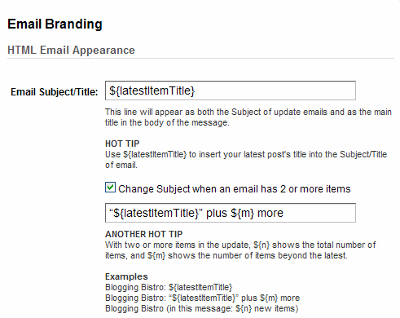
If you update your blog more than once a day, click the box that says, “Change Subject when an email has 2 or more items” and paste in the following code:
“${latestItemTitle}” plus ${m} more
I love your helpful social media posts. Especially when they take a minute to accomplish. Thanks for your clear instructions. 🙂
I love your helpful social media posts. Especially when they take a minute to accomplish. Thanks for your clear instructions. 🙂
Thanks so much for your feedback, Chris. There are a lot of fantastic social media blogs that approach topics from an “I’m going to teach you everything you ever wanted to know about this topic and provide you with 100 links to digest.” Those blogs are very helpful, but I often don’t have the time to implement all their suggestions.
My readers seem to appreciate short, practical tutorials that explain how to do one specific task, so my posts trend more in that direction.
I’m glad you found the tip helpful.
Thanks so much for your feedback, Chris. There are a lot of fantastic social media blogs that approach topics from an “I’m going to teach you everything you ever wanted to know about this topic and provide you with 100 links to digest.” Those blogs are very helpful, but I often don’t have the time to implement all their suggestions.
My readers seem to appreciate short, practical tutorials that explain how to do one specific task, so my posts trend more in that direction.
I’m glad you found the tip helpful.
Hmm. Unlike others, I’ve had a slight problem. I copied the code into the Feedburner section as instructed, but ended up getting ${the present title}, meaning the $ was there plus the { }. Any suggestions?