
How to Create a Custom Subject Line for Your Blog’s Feedburner E-Mail Updates
 One of the best ways to build a loyal readership for your blog is to encourage visitors to subscribe via e-mail or RSS feed.
Many bloggers use Feedburner (owned by Google) to manage their blog’s feed. By default, people who subscribe to Feedburner blog updates via e-mail will receive a generic e-mail whose Subject line reads something like:
Blogging Bistro – Latest Updates
But did you know you can customize the Subject Line so it displays the title of your latest blog post? The Subject Line for the article you’re reading would display like this:
Blogging Bistro: How to Create a Custom Subject Line for Feedburner E-Mail Updates
Most people scan their Subject lines before opening an e-mail; a dynamic Subject line will entice more readers to open it than the bland, “Blogging Bistro – Latest Posts” subject line.
How to tweak your Feedburner settings and create dynamic Subject lines:
- Log in to your Feedburner account.
- Click “My Feeds” and then click the name of the feed you want to update.
- Click the “Publicize” tab.
- In the lefthand sidebar, click “Email Subscriptions.”
- That’ll open a sub-menu. Still in the left sidebar, click “Email Branding.”
- Copy the following line of code and paste it in the form that says, “Email Subject/Title”:
${latestItemTitle}
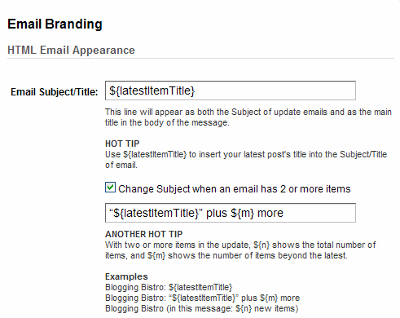
If you update your blog more than once a day, click the box that says, “Change Subject when an email has 2 or more items” and paste in the following code:
“${latestItemTitle}” plus ${m} more
I can't say how much I appreciate these tips that will help make using the tools I have now, even better and more efficient. Thanks!
Thanks … a useful hint. And by turning my attention to Feedburner for the first time in a long while, I determined that Google screwed up the transfer of my feeds to my Google account when they bought Feedburner; though the feeds were working (apparently), in order to access them I had to recreate them. Typical of Google’s approach to customer service, though.
Thanks … a useful hint. And by turning my attention to Feedburner for the first time in a long while, I determined that Google screwed up the transfer of my feeds to my Google account when they bought Feedburner; though the feeds were working (apparently), in order to access them I had to recreate them. Typical of Google’s approach to customer service, though.
[…] on July 6, 2009 on Blogging Bistro. Reposted by kind […]
[…] on July 6, 2009 on Blogging Bistro. Reposted by kind […]