
How to Create a Blogging Editorial Calendar
Part 4 of 4
One of the best ways to run the blogging marathon (see Part 1 of this series), is to adhere to a training schedule. Call it what you want: editorial calendar, blogging calendar, posting schedule.
Your editorial calendar lists topics you plan to blog about and plugs them into specific dates or days of the week.
An editorial calendar serves two main purposes:
- It shows you the big picture; you’ll immediately notice topic areas that need beefing up and can fill in the gaps.
- It provides self-imposed deadlines that motivate you to post regularly.
I suggest setting up your editorial calendar with whatever system you like best:
- Handwrite it on a large desk calendar
- Electronically schedule it in Outlook or on your Blackberry
- Put it on a spreadsheet or create a table in a word processing document
If you’re not sure what topic to write about each day, designate particular days of the week for a specific article format, and plug in topics later.
Here’s an example:
- Monday – Reviews (of books, music, movies, products)
- Tuesday – Top 10 list
- Wednesday – News
- Thursday – Commentary
- Friday – Humor
- Saturday – Guest column or interview
- Sunday – Day off
I keep my editorial calendar fluid, to give myself leeway for veering from my topic when the urge arises. But my general Blogging Bistro plan looks like this:
- Monday – Ask the Blogging Barista (reader questions)
- Tuesday – Review a blogging book or product
- Wednesday – Success story or client profile
- Thursday – Whatever strikes my fancy
- Friday – Guest column
Now that I’ve built the general framework for my editorial calendar, I plug article ideas into each day of the work week, giving myself permission to move topics around or reschedule them.
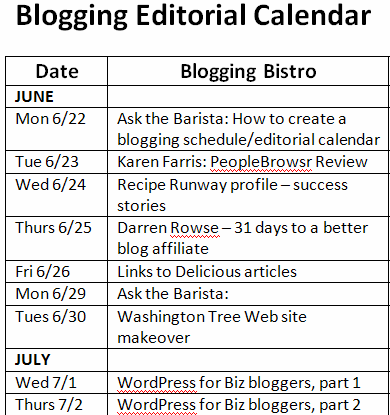
You can see from my calendar, above, that four of the five topics I scheduled for this week changed, because I got on a roll writing Monday’s post, and it turned into a four-part series.
Regardless of how often I tweak my editorial calendar, it serves its purpose: it reminds me to fulfill my blogging goals, and it keeps me on topic.
Your assignment:
Create your own blogging editorial calendar. In the Comments area, tell us about your topic and include a link to your blog so we can follow you.
Also in this series:
[…] less recent posts on editorial calendars, with shares of some of these – BloggingBistro shares their calendar, Outspoken Media talks about weekly and more indepth series, and Alicia […]
Great idea! I started just blogging randomly, then set myself a schedule of blogging MWF, just to give myself some routine. More recently, as I thought about the topics that I blog about, I also set up the sort of schedule that you recommend here. Unofficially, I have Mommy topics on Mondays, Writing topics on Wednesdays, and Book Reviews or Random posts on Fridays. I’ve used a big wall calendar beside my desk to keep track of book reviews – at a glance, I can see when I need to post a review and make sure that I’m not scheduling too many reviews at the same time. 🙂
Great idea! I started just blogging randomly, then set myself a schedule of blogging MWF, just to give myself some routine. More recently, as I thought about the topics that I blog about, I also set up the sort of schedule that you recommend here. Unofficially, I have Mommy topics on Mondays, Writing topics on Wednesdays, and Book Reviews or Random posts on Fridays. I’ve used a big wall calendar beside my desk to keep track of book reviews – at a glance, I can see when I need to post a review and make sure that I’m not scheduling too many reviews at the same time. 🙂
Excellent idea about using a wall calendar to track reviews. On WordPress.org, I use the “Editorial Calendar” plugin, which shows a whole month at a glance, in a calendar format. Works kind of like a wall calendar for me.
Excellent idea about using a wall calendar to track reviews. On WordPress.org, I use the “Editorial Calendar” plugin, which shows a whole month at a glance, in a calendar format. Works kind of like a wall calendar for me.